Chromecast, Net Neutrality and the Rise of New Gatekeepers

Sep 16, 2013

For the past few weeks, I’ve been enjoying starting to use my new Chromecast. For those who don’t know, Chromecast is Google’s new internet-video-to-tv device — plug it in, then stream web content from any device to your TV.

The Chromecast experience has been eye opening, and it perfectly illustrates the opportunity and challenges we’re facing in terms of broadband and content policy.

First: the experience — we’ve been watching Netflix and Google Play videos over Chromecast and the experience has been great. It has been a breath of fresh air to be able to push web content from any of my devices (phone, ipad, nexus7, computer) to the TV. Especially with small kids, portable video content is super important. And nothing drives me more nuts than buying a video (say, Wreck-it-Ralph) on one platform (Verizon FIOS at home) and then buying it again on another (Google Play). So being able to collect content online and push it to the TV wherever I am has been so so so nice.

It also really helps that Chromecasts are priced at $35. That way, I can buy as many as I need, and put them wherever I want — like at my in-laws’ house, which I plan to do.

For me, this is perhaps the first experience that’s really proven the model of “over-the-top” video on TV. Even with Boxee and Roku, I never got into a steady pattern of using them. The fact that the Chromecast devices are cheap, and controlling them happens from any mobile device or computer really broadens the surface area of the experience.

So, this raises the question of competition. Of course, Chromecast is a (welcome!) direct threat to video services offered by cable providers. Already this is bearing true — I’m way less likely to buy an on-demand video from Verizon now. So it’s perfect test case to think about Net Neutrality, which has been in the news this week, as Verizon and the FCC battle it out in court.

In a nutshell, the argument for net neutrality is that ISPs (like Verizon and Comcast), which currently have near monopoly positions in broadband service, are in a position to favor their own services in the face of this competitive threat. So, for example, instituting data caps that apply to Netflix but not to video-on-demand; or by throttling web video. To avoid this, providers like Netflix and Youtube could strike a special deal with the ISPs for “fast lane” service. The net result of this would be a big blow to small innovators (“the next netflix|youtube”), who naturally wouldn’t be able to afford such fees.

The argument against net neutrality is that broadband providers have never been classified as “common carriers” (the classification that allowed similar rules to be placed on phone-based ISPs in the dial-up era), and aren’t subject to such rules. Further, net neutrality assumes a monopoly environment that doesn’t exist (with the growth of mobile internet, mesh networks, etc.). Instead, we should stay hands-off and let marketplace competition do the trick here.

Freedom is such a slippery issue. One way of looking at the argument around net neutrality is about the freedom of ISPs to manage their services as they please, vs. the freedom to watch & participate (as consumers of media) and the freedom to publish (as producers of media). Thinking about it through that lens, and taking the history of the internet thus far into account, my position is to favor creators and consumers. The best thing about the internet is that everyone can become a creator — the smallest blog can become a news powerhouse, and the smallest side project can become the world’s biggest personal video platform. This potential to start from nothing and reach millions of people is the heart of what makes the internet great and empowering.

With this issue heating up again, we’re starting to see more public discourse around it. If you haven’t seen it yet, here’s a pro-net-neutrality video, The Internet Must Go, that just launched last week:

And for some counter-arguments, here is TechFreedom’s commentary of the Verizon / FCC case.

Back to Chromecast for a sec: on top of all this, Chromecast introduces a new layer: for now at least, Chromecast appears to only work with “approved content partners” (so far, Netflix, Pandora), and Chromecast may be actively blocking some apps. So this puts Google in a new type of gatekeeper position, though a less defensible one, since anyone can connect anything to their TV. This is particularly interesting given how Google has begun to close up the Android ecosystem, but that’s a subject for another post.
Why It’s Expensive to be Poor (And Why It Shouldn’t Be)

Sep 13, 2013

I spent the day yesterday at the Consumer Financial Protection Bureau in DC, at an event discussing mobile payments and related innovations and regulatory issues.

Naturally, this is a big issue, with the huge rush to mobile everything, the continued expansion of software-powered web businesses, and the emergence of new payment technologies (from far-out tech like bitcoin to new practical applications of existing tech like paying for a cab with your phone).

The session that most grabbed my attention was one on “Opportunities for the Underserved Community” — how payments tech and mobile payments might or might not help those will less financial and societal resources.

Dan Schulman from American Express evoked James Baldwin’s famous line:

“anyone who has ever struggled with poverty knows how extremely expensive it is to be poor”.

The gist being that the closer your balances are to zero, the more difficult and more expensive everything gets. As per normal, Louis CK explains it best:

“you ever get so broke that the banks start charging you money… for not having enough money?”
“So they charged me; they charged me $15. That’s how much it costs to only have $20.”

And it’s not just “the poor” as you might imagine it: a recent FINRA study suggests that 41% of americans spend all of or more than their monthly income.

That means that 41% of Americans are managing their cash flow in a hard core way, and are living at, close to, or beyond zero on a regular basis. This is shitty (and I know from personal experience).

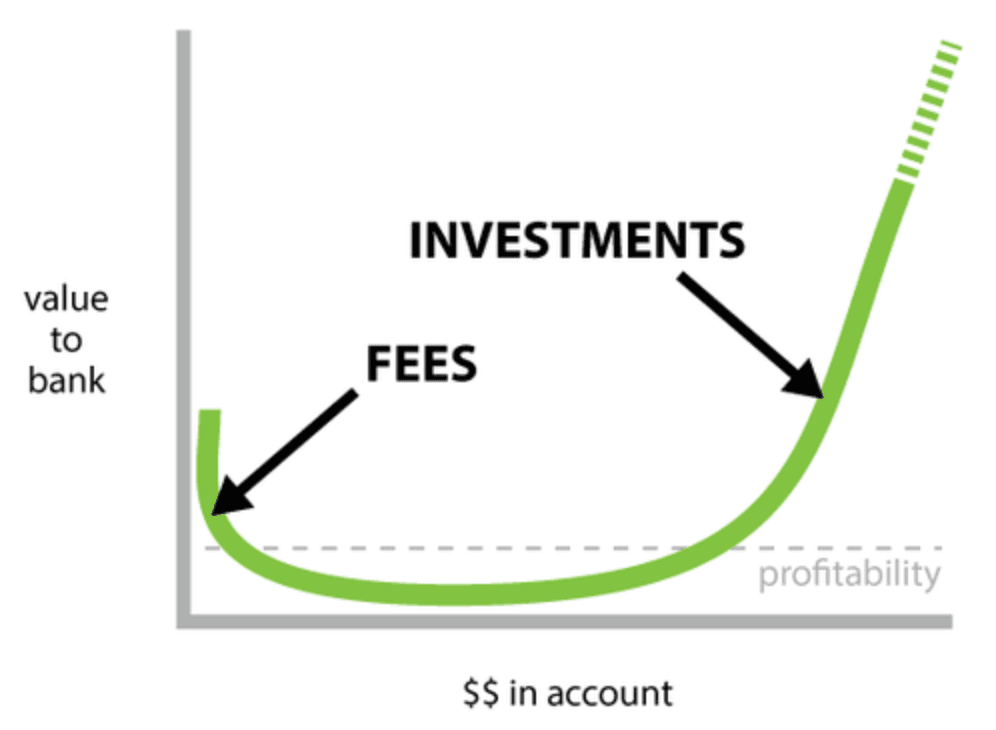
So what does that mean for mobile payments, banking and the internet? Well, it helps to look at the business model of traditional deposit banking, which looks something like this:

image

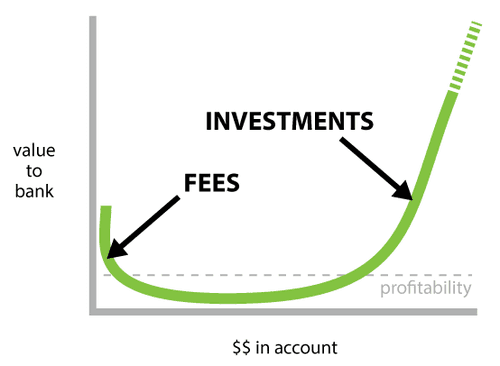
This is an oversimplification, but essentially consumer banks make money on deposit accounts in two ways: by investing the money of wealthy customers, and by charging fees to folks hovering around zero.

You’ll notice the big dip in the middle — the low-balance accounts that neither earn fees nor have investable balances. Schulman noted that these accounts are unprofitable for banks, and make up nearly 40% of all deposit accounts.

What this says to me is that the banking business model is misaligned with lower and middle income consumers. If the banks’ cost structure means that 40% of consumers are unprofitable, and we make up the difference by levying fees on the poorest customers, we have a problem.

What’s interesting is that not only is this bad for society, but it’s also a big business opportunity.

Part of the reason banks can’t serve these customers profitably, and have to resort to fees on low-end customers, is that their overhead and transaction costs are so high. That made sense in a brick-and mortar era, with layers upon layers of analog financial middlemen, but it doesn’t make sense in the age of software and the internet.

Just consider what USV portfolio company Dwolla’s mission is: “Allow anyone [or anything] connected to the internet to move money quickly, safely & at the lowest cost possible.” Or, put another way: to enable the system to actually work the way most people assume it does (i “transfer” money to you and — poof! — you have it).

The internet and software-based businesses bring distribution and transaction costs down, practically to zero. They also tend to put a high premium on design and user experience.

If you put those two things together, you have the ingredients for building a better banking and payments system — one that helps people when they need it (e.g., when making financial choices and transactions), has a business model that’s aligned with users and not opposed to them, and that scales to the size of the population at extremely low cost.

So, when I think about what the opportunity is for new regulators like CFPB (not to mention startups in the space), it’s to imagine a future where radically new opportunities are opened up for all consumers, building on the potential of ultra low transaction costs, great user experience, and high transparency (and to think about how to allow for the experimentation and barrier-to-entry breaking it’s going to take to help us get there).

These are the fundamental principles behind every web and mobile application, and I think they have the potential to solve some of the thorniest and most deeply embedded problems facing our society.

Happiness = meaningful social connections

Sep 12, 2013

I’m writing this from the DC metro, which I love. Getting from the airport to downtown dc is one of the great joys of traveling. I can’t think of a single airport that is as conveniently connected to a major city by mass transit.

But the point of this post is not to talk about subways — but rather to mention something I heard the other day.

Cescalouise and I were watching a documentary called Life After Porn, which was great. It followed porn stars from the 70s 80s and 90s to see where they ended up and how.

One of the patterns was the social shunning that happens once you enter the porn industry. Not surprising, but ironic, as one person said: you bring everyone pleasure and then they want to pretend that you don’t exist.

And one of the results of that was that people can become very isolated and/or trapped within the industry community.

A historian covering the topic put it this way: happiness is the result of meaningful social connections. (And when those are systematically cut off, and people further isolate themselves, negative situations compound themselves).

This is not necessarily a huge revelation, but still, it stood out to me.

As I wrote about last week, social connections are now earned as much as they’re inherited. They are a garden that you get to tend and grow. And a great joy comes from the result of that growth.

I personally get a ton of pleasure from getting to know the people around me (at my sandwich shop, my barber, the bank, etc). But I wasn’t always good at it (I was a really shy kid growing up in a big city), and its also so easy to get swept up in the business of your day to day to take your relationships for granted. Luckily I married someone for whom it comes super naturally, and who I’ve learned a lot from in this regard.

Social Connections: from Something You Inherit to Something You Earn

Sep 6, 2013

(I’m writing this on the amtrak to NY as my computer quickly runs out of battery, and I have no charger, so this’ll be short…)

Somehow, earlier this week, I came across Zenep Tufekci’s piece from last spring in the Atlantic on Social Media’s Small, Positive Role in Human Relationships. I liked it, but I guess of course I would.

The article responds to the commonly-held idea that social media is removing human contact, and her point is that it’s actually just shifting it, and is likely net increasing it.

But the idea here that really stood out to me is that social connections are moving from “something to inherit” to “something to earn”:

In sum, social media is propelling transitions and disruptions in the composition of social networks. Increasingly, what used to be a given (social ties you inherited by the virtue of where you lived or your familial ties) is now a task (social ties based on shared interests and mutual interest). Surely, there will be new winners and losers.

That is a pretty profound and inspiring statement.

Of course, the social connections you inherit will always be powerful (for better or worse). But the fact that we now have a vastly enhanced ability to earn and build our own social connections is a big deal, and a nice way of thinking about things.

My Top 5 Personal Productivity Hacks

Sep 3, 2013

I can’t claim to be the most disciplined or organized person, but I’m working on both.

I have, however, done a lot to smooth out my moment-to-moment work process, to help me do things more quickly & easily, and to help me avoid distractions where I can. I can only hope that I win more time using this stuff than I spent setting it up.

So if you’ll indulge this lifehacking moment, here’s my top 5 list of personal productivity tools / hacks:

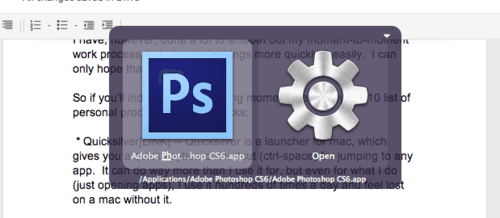
1) Quicksilver — Quicksilver is a launcher for mac, which gives you a quick keyboard shortcut for jumping to any app. For example, if I press control-space (to open quicksilver), and then press “p”, it prompts me to open photoshop. It’s also awesome at remembering your choices and learning from them, so it always presents the thing you want as the first option. It can do way more than I use it for, but even for what I do (just opening apps), I use it hundreds of times a day and feel lost on a mac without it.

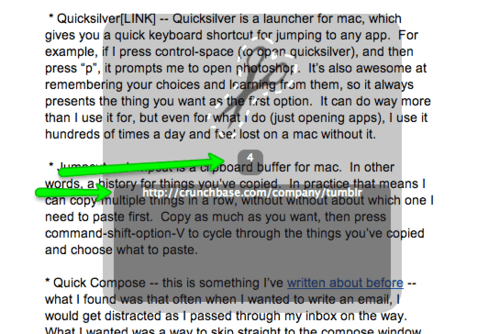
2) Jumpcut — Jumpcut is a clipboard buffer for mac. In other words, a history for things you’ve copied. In practice that means I can copy multiple things in a row, without without about which one I need to paste first. Copy as much as you want, then press command-shift-option-V to cycle through the things you’ve copied and choose what to paste:

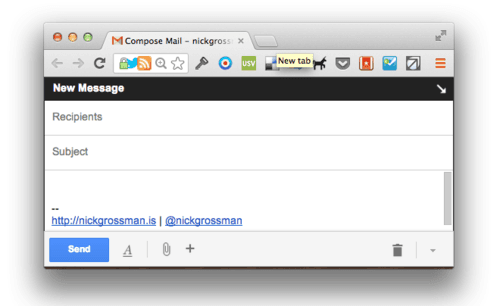
3) Quick Compose — this is something I’ve written about before — what I found was that often when I wanted to write an email, I would get distracted as I passed through my inbox on the way. What I wanted was a way to skip straight to the compose window. Luckily, this is possible using Quicksilver — I have a “Custom Trigger” set up, so that wherever I am, Command-Shift-M will pop open a new browser window with the gmail compose screen on it. I use this all day long.

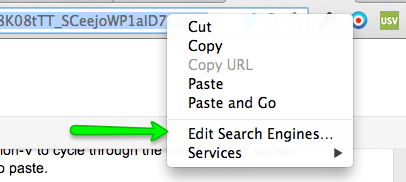
4) Chrome search shortcuts — One of the lesser known features of Chrome (and I believe firefox, and maybe safari too) is the ability to customize your search engines. Of course, this means setting a default for regular web searches (I use DuckDuckGo), but you can also set up more specialized keyword-based searches. For example, if I go to the chrome bar, and type in “t nickgrossman”, it will take me to http://twitter.com/nickgrossman — because I’ve set up a custom twitter shortcut with the letter t. I also have one for Crunchbase, which I use all the time — so I type “c tumblr” to get a quick link to the Tumblr Crunchbase page. And the one I use the most is the Gmail Search extension, which lets me go directly to searching my email by entering “gs <search-term>” in my address bar. Similar to Quick-Compose, this keeps me out of my inbox when I don’t need to be there. To customize your search queries in chrome, control-click (or right-click on PC) the address bar, and choose “Edit Search Engines…”

5) Jing — I use Jing all day long to take and share screenshots. I hit command-shift-J and the Jing screenshot grabber pops up. You can then draw on the screenshots if you want, and also post them to share — either to Flickr, email, or FTP (which is what I use, posting them to my own web server)

Bonus!) Bookmarklets and Chrome extensions. Everyone who works with me knows I love these. So much. I use them for everything, and have even recently learned how to make my own. My favorites are: post to tumblr, post to delicious, add to pocket, add to feedly, send with gmail (maybe my all-time favorite), and many many more (even a few top-secret ones).

As I look through these, the obvious theme is “shortcuts”. Keyboard, chrome button, etc. I guess really like things that let me go straight to the thing I want to do. And maybe it drives me nuts when I can’t. I like the fact that the computers I use are hackable / open enough to make this stuff possible, though of course, that is changing.