The Perfect Conference Format

Oct 14, 2009

I’ve been attending a lot of events lately, and one thing that keeps coming up for me is that the multi-day conference / workshop format is a bit broken. My main beef: by day two (or god forbid, day three) the audience has petered out and whatever energy was there on day one has been lost. I felt like this happened at last year’s (excellent) Nonprofit DevSummit, and even at last week’s incredible Open Cities Conference. It’s a bummer, because these events always draw together really awesome people, but they can often fall short in a few regards.

Here’s how these events typically go:

  • Day 0 (evening before conf begins): maybe some late drinks with attendees as they arrive, or just heading straight to bed after travel.
  • Day 1: Conference begins in the AM — introductions and big kickoff. Woohoo! Everyone is so psyched! Evening socializing (very important).
  • Day 2: Morning attendance shows that some people have split (sometimes for good reason, sometimes to get a breather or explore a city on their company’s dime) — participation is good but waning. More evening socializing.
  • Day 3: Lame-o stragglers pick up the pieces. Poo!

The ideal conference would keep everyone there and fully engaged for the whole time, right?

So, what to do about it? Some suggestions I’ve heard: only accept RSVPs if people commit to all days (not realistic); schedule some awesome speaker for the morning of day 2 or 3, to draw people along (not a bad idea); limit conferences to just one day (sometimes tough to justify travel).

But this morning, I may have come across the perfect format. Talking to John Barstow from Orton Family Foundation (about our joint project, the Community Almanac), he described how they organized their recent staff retreat:

  • Day 1: Conference starts in the afternoon, to allow for morning travel. Introductions and orientation. Excitement! Evening socializing.
  • Day 2: The real meat of the conference — all day activities and good stuff. More evening socializing.
  • Day 3: Casual breakfast and wrap-up. Time to decompress, process what went down, schedule any ad-hoc follow-up, then plenty of time to relax and travel home.

I gotta say, I really love this format — there’s still enough time to get real work done, and there’s no lame aftermath moment. I think I’ll be scheduling my next event this way.
Silenced!

Sep 9, 2009

Today, I got my first dose of Twitter smack down, as my account was suspended along with a bunch of others following yesterday’s Gov 2.0 Expo. Ouch! Well, at least I’m in good company.

As one of the commenters on the Tech Crunch article noted, a situation like this is definitely a bit of a wake-up call about relying on one service for your communications. I felt eerily powerless this morning when I couldn’t tweet about not being able to tweet…

Help! Can't drop

Jul 12, 2009

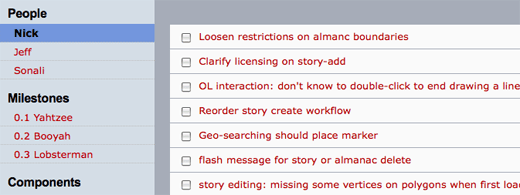
When I couldn’t sleep the other night, I started mocking up a zippy drag-n-drop front end for Trac, based on the snappy UI of tools like Things (working title is FasTrac). Then, bam! Bitten by a weird, seems-like-a-bug w/ jQuery UI drag and drop. It appears that droppables aren’t discoverable by draggables if the droppable has a fixed width. I have a hard time believing that’s true, yet here I am. I posted to the jQuery UI list, but haven’t heard back yet.

Any ideas? I’m sure I’m missing something super obvious…

Here’s a working example illustrating the problem.

Welcome Theo

Jul 7, 2009

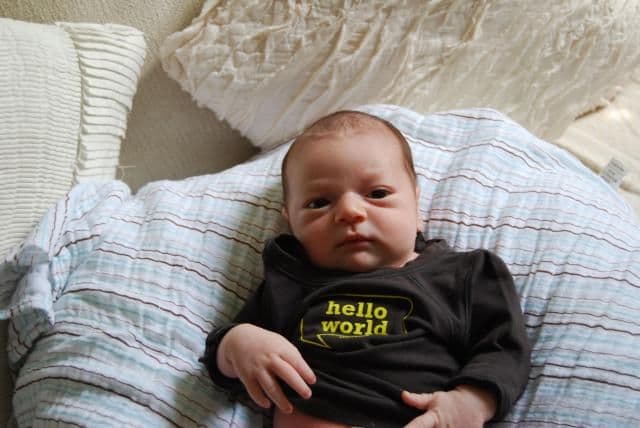
Introducing the newest member of the clan: Theo. It’s now been nearly two weeks since Theo joined us, and it’s been pretty amazing (and tiring) thus far. I’ve been intentionally keeping him off of the public intertubes, but figured one cute “hello, world” shot was safe enough. I am enjoying every minute, while secretly waiting for him be big enough to play baseball|basketball|golf|skiing|tennis|surfing|football with dad….

Introducing The Board

Jun 21, 2009

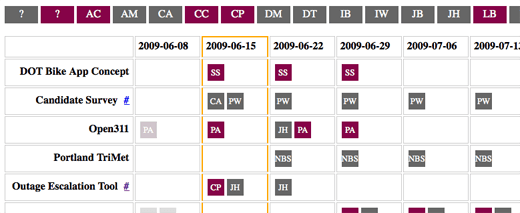
A few weeks ago, I created a small web app for scheduling project teams at TOPP Labs. At any given time, we’ve got anywhere between 10 and 20 active projects, so keeping track of it all is difficult, and planning ahead requires a good clear overview of everything that’s happening.

Why create something new? Good question. Before I started making a custom app, I experimented with a few existing tools. I started with a basic spreadsheet. Then, I tried dedicated project scheduling tools like OmniPlan. While each of these tools got me part of the way there, nothing was exactly right. Spreadsheets were too slow and OmniPlan was too complicated. I really wanted to do one simple thing: drag people around from project to project on a weekly basis — including the ability to experiment with different configurations. I didn’t need to get more granular than “project”, “person”, and “week”, and I needed something that would let me change these parameters easily and quickly.

usopen-ball

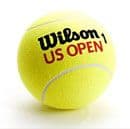
The inspiration for what I wanted came from my time as a ballboy at the US Open tennis tournament. At the Open, there are 18 courts, ~300 ballpersons, and 4-5 shifts per day. At every shift change, a crew of 6 ballpersons is assigned to each court — each team consists of 4 “backs” and 2 “nets”, and the team makeup (ratio of veterans to rookies, etc) is critical. The staff at the Open manages all this is with a giant magnet board, holding one magnet for each ballperson. Before each shift change, the staff sets up “crews” by dragging the magnets around the board, grouping them, and finally assigning them to courts. It’s a perfect system for the job — just the right amount of detail, and highly visual and tactile.

In many ways, that was exactly what I needed. The result is The Board — a virtual magnet board for managing teams. Check out the demo to poke at it and the project page for code. Enjoy!