Tool Time

Aug 13, 2010

We are starting up several projects right now at OpenPlans. As a first step, we are setting up project management infrastructure for each. You would think that being a 10-year-old software and media company, we’d have rock-solid, time tested, perfectly smoothed out techniques for managing our projects. The truth, as it often is, is a bit more complicated than that.

Part of the reason is that we run a series of reasonably independent projects, that have started at different times, and have different needs. Some are existing open source projects that already have communities and tools in use. Others are more traditional client projects. Others are internal projects. And so on. Point is, we’ve never tried too hard to standardize, and our general philosophy is to use the tools that best fit the particular job.

Since we spent a bunch of time debating our options and experimenting with tools over the past few weeks, I figure it’s worth putting down on paper what we chose and why.

Here’s the stack we ended up settling on for one of our new projects, OpenBlock.

Time tracking: Tick
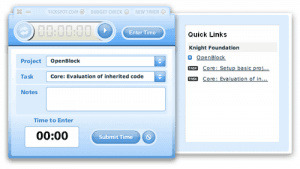
Why: We were looking for an easy way to track time against a set of high level budget items. Quick input of time sessions was key, as was keeping track of how our logged hours matched up to our budget. In the end, we chose Tick, primarily due to the slickness of their desktop widget. I was thinking that an IRC-based hour logging client built on any time tracking tool’s API would be the way to go, but the Tick widget really is far better than that would be. Tick also has really nice budget progress indicators built in to the time logging widget.

Notes: Tasks are duplicated here from our budget, and actual work tickets (in the public Trac) are kept separately. But since we’re only tracking on a high level, that’s fine for us. The Tick/Basecamp integration was surprisingly unhelpful. As of right now, it lets you automatically post time entries as Basecamp messages and lets you import time from Basecamp into Tick. The feature I really wanted was the ability to sync tasks between Basecamp and Tick, using the Tick widget to track time against Basecamp tasks. The other missing feature needed to make that actually work is task estimates in Basecamp, which currently aren’t supported.

Alternatives we considered: HarvestFogBugzAssembla

Client hub: Basecamp

Why: Basecamp has a nice, clean, friendly user interface, and makes it pretty easy for our clients to stay up-to-date and for us to share docs and to-dos. I’ve been a fan of 37Signals ever since I saw Jason Fried give a talk back in 2004, and I consider their book Getting Real to be somewhat of a bible.

Notes: The Messages tool feels wrong, especially for those of us who spend a lot of time on regular mailing lists (only the top response is sent via email, so you can’t reply in-line). Their shared document tool (Writeboard) is not well integrated. It would be sweet if they used Etherpad now that it’s open source. We’ve found Etherpad to be one the absolutely most useful collaboration tools, and now that Google acquired it and Etherpad.com is shut off, we run our own internal instance and can hardly live without it.

Alternatives we considered: Assembla, Google Groups. Apparently activeCollab is maturing as an open source Basecamp-like thing, but we didn’t really explore it as we were looking for something we didn’t have to maintain.

Wiki & ticket tracker: Trac

Why: We’ve been heavy trac users for many years, and our former coworker Jeff Hammel has written a lot of trac plugins. We also felt it was important to host the ticket tracker for this open source effort on a portable open source platform, rather than on a pay-as-you-go hosted service.

Notes: Trac has a ways to go in terms of user interface (which I’ve hacked on a bit), but the platform is flexible and powerful.

Alternatives we considered: Google Code, GitHub, Lighthouse

Mailing list: Google Groups

Why: Thanks in part to our resident in house open source process expert, Karl Fogel (who is currently working for O’Reilly and Code for America out of our office), we decided not to start a new mailing list and instead just join into the discussions already happening at the “EB Code” list — this is the list created by the EveryBlock team when the code went open last year.

Code repo: GitHub

Why: We chose GitHub for its sociality and community. In the past, we’re run most of our projects out of our own SVN, but are increasingly moving to GitHub because it’s easier for people to find our stuff and participate that way.

Alternatives we considered: our SVN, BitBucket

Project blog: Tumblr

Why: While we are huge WordPress fans and long-time users, we decided to use Tumblr for our team blog here. Primarily just to have one less thing to maintain, but also because we like how easy it is to post snippets, screenshots, and other short notes using Tumblr. Separately, we just started another group Tumblr blog at dataintoaction.org, and are enjoying it.

Notes: There’s not yet broad support for group blogs in the Tumblr theme ecosystem, but I imagine that will improve over time.

Alternatives we considered: Posterous, our own WordPress. We almost went with Posterous, which has a more vanilla default template and better OOB group blogging support. But Tumblr’s handy bookmarklet for quick posting won us back over.

A note on Assembla:

The stack we ended up with is actually quite similar to what we started out thinking we’d use. The big monkeywrench came when we started exploring Assembla, and realized that it did a bunch of the things we were looking for: issue tracking & milestones, estimates & hour tracking, mailing list, team wiki, code repo integration, and (way, way) more. It seemed like we’d be able to solve our client hub, internal estimating, and hour tracking needs with a single application.

However, one issue got in the way of us using it: Assembla handles estimating reasonably well using it’s Agile Planner view, but time estimates and hours are not well integrated elsewhere on the site (namely in ticket queries and in API). And on the flip side, important ticket filters aren’t available on the Agile planner view. So, we couldn’t get the view we were looking for in either case.

But I think Assembla has potential — it’s a little rough around the edges, and they’re trying to do a lot at once, but it’s not bad. If I were them, I would open source the code and focus on hosting. As an open source project, I think Assembla could easily beat out other competitors (namely Trac), and people who want don’t want to run their own would still pay for the hosted version. This is how Acquia and OpsCode run their businesses, around Drupal and Chef, respectively, and it seems to be working for them.

Takeaways:

The big takeaway is that there isn’t one solution to rule them all, and that we should be at peace with a heterogeneous set of tools that work together for us.

In the end, we realized that the biggest concerns for us were a really nice interface (critical for something you use all day every day), and solutions that were relatively low-hassle. While we are an open source organization in mission and practice, we don’t always choose the open source tool, because in the end we need to focus on doing our work, not maintaining our tools. I think my ideal combination would be a hosted open source app, where we could deploy our own and hack to our needs if that made sense.

Anyway, we’re glad to be all set with tools so we can get to work!

Elevator pitches, weddings and babies

Jul 28, 2010

At OpenPlans, we’re busy signing up new clients for our products & services, and we’re also spending a lot of time fundraising (from individual donors, foundations, etc.). As such, I’ve been thinking about how we pitch our organization, and have recently spent some time over the past few days reading some of the great stuff over at VentureHacks. Their book, Pitching Hacks covers the fundamentals, from what matter to investors (traction), to how to get introductions, to how to structure your pitches (whether high-concept, elevator, or slide deck).

Then, this morning while reading Hacker News (or more specifically Nirmal J. Patel’s full-content RSS of Hacker News), I came across this posting which caught my eye:

Technical co-founder wanted for disrupting the wedding industry.
Hi, my name is Tracy. The wedding industry is huge, overpriced, and with insane profit margins. I’m looking to disrupt it with WeddingType.
In wedding invitations alone, there are two options: spend hundreds of dollars for custom designed invitations (expensive but pretty), or do-it-yourself (cheap but ugly). I want to build a web application catering to the price sensitive couples who have an aversion to Comic Sans.
A do-it-yourself wedding invitation kit costs $45, while professional wedding invitations are hundreds or thousands of dollars. With WeddingType, the service will guide the user through a constrained flow of inputs which will populate a set of pre-designed templates with professional typography that they can print out and get hitched. The completely automated service will charge $25 and send the user a PDF by email.
My goal is to get this out really fast and start making revenue from the start, then see how big we can grow it. From here, there are multiple ways of increasing value and revenue — licensing to wedding invitation template manufacturers, selling custom design solutions, offering templates through the site, etc. Large scale, could sell templates through the site, printing and mailing like Moo.com.
I freelanced and worked at a startup for five years as the primary designer/jack-of-all-trades for everything relating to their web properties, including analytics, usability, design, HTML/CSS, and multivariate/AB testing. I need a technical partner who is enthusiastic about the business and a web programming whiz. Preferably in the Bay Area, and if everything goes right, we’ll apply to Y Combinator for the next Winter session.
Intrigued? I’d love to meet you, perhaps work on a small project together.

This is not a perfect pitch, by my or VentureHacks’ standards — in fact, I am not fully convinced by it after the first paragraph. However, I think the title and first line are good, and they are what drew me in.

Speaking from recent experience of getting married (in 2005) and having a baby (last year), I can say with absolute certainty that these are both huge markets where there’s an opportunity to be smart and offer products that will serve people well, save them money, and be profitable. In this pitch, it was the problem/opportunity statement (“The wedding industry is huge, overpriced, and with insane profit margins”) that got me. I certainly agree with that part. Wedding invitations are one piece, and there are many others. My wife has a million ideas for businesses in this space. If I were an investor in XX Combinator, I’d definitely start here.

Missed Connections

Jul 21, 2010

In her bathroom, a friend of mine has some really beautiful illustrations of posts from the Craigslist Missed Connections section. If you’ve never looked at missed connections, you should — there are some really wonderful notes in there (also some sketchy ones). Here’s a beautiful one from today:

7 train glances on monday – w4m – 20 (7 train Queensbound)
We were sitting opposite each other on the train. We caught eyes early in the ride, but you nodded off through most of it, but looked up as I was getting off. As the train moved you kept looking at me walking to the stairs.
All I want to tell you is that you have the most beautiful clear blue grey eyes.

What’s striking is how many of the missed connections take place in the subway. I’ve said before that transit is a uniter not a divider; these posts confirm that, and are a really nice view into that slice of NYC life.

The “ad hoc groupings” that take place on the subway also really resonate with the ideas in Dave Weinberger’s Small Pieces Loosely Joined, which I’m reading right now. Dave talks about how on the web, groups take on a new meaning — they form and unform quickly, and can be formed by very loose connections (such as commenters on a blog post). The city is the same way — the people I’m standing with on the subway are an ad-hoc group that unforms just as fast as it forms. But there’s definitely a connection. Typically, it takes an event of some kind, like a man talking into a banana phone or two people having a loud argument, to draw more outward communications among riders. But underneath it all, there’s a hidden set of communications going on, and it’s really beautiful to see it unearthed through Missed Connections.

It turns out the posters are by a Brooklyn-based artist named Sophie Blackall, who has a whole poster series + a blog on Missed Connections. Really nice.

Wanted: Aggregated Group Playlist

Jul 17, 2010

I love music, but I am really bad about keeping up with new stuff. My iTunes library is only so-so, so I spend most of my time listening to playlists on 8tracks. This is good for variety, and great for finding the right background music for a BBQ or party, but there’s something missing: my friends.

I have a few friends who have great taste in music, and who are totally on top of what’s new and good. As it works now, every once in a while I’ll get a recommendation from one of them, I’ll buy the album on Amazon, and then I’ll listen to it non-stop for a few weeks. It’s great when it happens, but it doesn’t happen that often. I want something more automated and frequent.

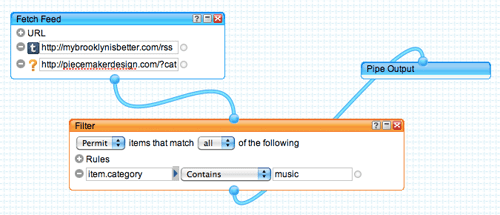
A few of these friends publish their music on the web (see Piecemaker and My Brooklyn is Better). Problem is, they each use different platforms to publish, and as far as I can tell, there’s not a great way to combine these into one stream. Piecemaker uses WordPress and outputs a standard podcast feed, and My Brooklyn is Better uses Tumblr, which embeds a flash player and forbids linking directly to the audio file. I’m sure I have other friends who are publishing on platforms (Last.fm, 8tracks, Facebook?) that I don’t know about yet).

So, what I want is a way to take these streams, regardless of platform or format, and create a mixed feed or webpage. I don’t care about actually downloading the music; I just want to be able to listen on the web, keep track of the ones I like, and have the option to buy the albums later.

I’m sure this is possible using some combination of tools that are already out there. For starters, I’m playing around with Yahoo Pipes to see if I can mash something up to my liking, with an eye towards playing it on the web using StreamPad. We’ll see if that works. But is there something out there that I’m missing that already does this in a more straightforward way? Seems like there must be, but I haven’t found it yet.

Unplugging (sort of)

Jul 14, 2010

This week, we’re on vacation in Cape Cod with my wife’s family. They’ve been renting the same tiny cabin by the beach for the past 35 years, and coming here is pretty much the highlight of our summer each year. Last summer, we brought Theo here when he was just three weeks old. This morning, he and I took a walk along the harbor in Provincetown at low tide — he thinks of each beached boat as a giant bucket, just waiting to be filled with sand.

The problem is, whenever we’re on vacation, I have a hard time finding the right balance between “unplugging” and staying engaged with the real world. One the one hand, I want to remain connected with work and friends, on the other, I just want to tune out, relax, and be with the people I’m with. Inevitably, I end up fighting the struggle each day, carving out some time for the important stuff at work, and forcing myself (with limited success) not to stress about it too much the rest of the time. It’s tough, and to some extent I feel like I achieve the worst of both worlds: neither able to fully enjoy my break, nor be fully present for important happenings at the office.

This has become more of an issue as technology has evolved. Here at the cabin there’s never been any phone or TV. Then there were cell phones. Next, internet down the road at the town library. Then, iPhone and blackberries. Now, this year we have a mobile broadband connection for our laptops, so we’re as connected as we can be. For certain things, it’s great: we watched the World Cup final online last weekend, and yesterday my father-in-law did an interview via Skype, which saved him a day-long trip up to Maine. But, work email and things to do are now within arms reach at all times.

I suppose the vacation case is just a microcosm of the larger question of how to balance real-world face time with online time. Fred Wilson, one of my favorite bloggers, covers this topic frequently, and I’m really amazed the extent to which he’s able to stay engaged with the networked world without driving his family crazy. In our case, the family is only semi-digitally integrated; it’s just not part of our culture to always be connected. Maybe getting an iPad would push that culture change in a good way.

Lastly, I think it also comes back to information fitness — using online (all?) time to do the most important and productive things, and not just consume endlessly as you might in a less online constrained environment. And of course, one of these days I’ll be able to plan ahead enough so that everything is under control at the office and I don’t have to worry about anything. But I’m sure if I did that, I’d find reasons to plug back in…